WoW, now this is one hell of a news. People on the internet playing around with what the GS can do have come up with something really interesting. 1080 playback baby ! Yes ! Who needs a big expensive tv when you can play the same thing on this mini phone, or in other words the MONSTER iPhone :P !People over at engaget.com states that We always suspected the iPhone 3GS was capable of 1080p HD video playback, and now we've got proof. Although Apple lists the iPhone 3Gs's max video playback res at just 640x480, iLounge linked to Chinese forum post claiming that the 3GS could do 30Mbps 1080p playback earlier today -- and when we saw that the only thing we needed to do to test it out was download the free FileAid app, well, you know how we've just spent the last 20 minutes. We tested out a bunch of HD trailers from Apple's QuickTime trailer site, some videos we shot with a Lumix DMC-GH1 and some other random videos with general success, but there were some major hiccups: high bitrate 720p video off the GH1 stuttered during playback, and loading the Avatar trailer consistently crashed the phone's audio driver until we restarted.
We tried the same thing on an iPhone 3G and just got error messages at almost every resolution, so it seems like it's a combination of the 3GS's extra horsepower and different built-in software at work here -- software that's clearly not ready for prime-time, as evidenced by the bugs. We're hoping Apple is polishing that up and getting to unlock this functionality, since it'd be sweet to just plug into an HDTV and play video -- anyone listening out there in Cupertino?
This is taken from iclarified and modmyi.com. Geohot states that "With regards to devs comment that I use tons of ram, that was all RC1. This one uses 0, yes ZERO, bytes of ram after it is installed. But I'm happy you guys came around to my way of unlocking :-) And not just one of my ideas. You took them both. "
Via Geohot blog:
* 3G(the network speed) issues fixed * Now only patches one file, CommCenter * Leaves no traces on your baseband after it runs. Seriously * Much more clean and reliable.
Be sure to have legit activated 3GS Disable 3G if you don't have it(like T-Mobile). Add apt.geohot.com to Cydia Install(or Update) com.geohot.purplesn0w Watch for success output in Cydia(actually do this step) Wait for signal, and enjoy your unlocked iPhone(no reboot required)
This is taken from iclarified. The guide clearly shows how to jailbreak the iPhone 3GS with the new firmware. The process is identical to all the other previous redsn0w guides. This will just jailbreak your iPhone. It will not unlock it. To unlock the iPhone 3GS use ultrasn0w (info here). This guide is for 3.0 only. NOT 3.1.
Find your iPhone 3GS 3.0 firmware file. Select it and click Open.
redsn0w says your IPSW has been successfully identified. Click next.
redsnow starts doing its thing.
Select your options. Click next.
Follow the directions to get your iPhone into restore mode.
redsn0w starts uploading everything to your iPhone.
You will see the done screen. You can click finish at this time. On your iPhone you'll see some text and the pwnage icon for awhile as your iPhone is being jailbroken. Do not mess with it during this time. When it is finished your iPhone will be on the lock screen fully jailbroken
Its not official yet but here is a chance to see what the dev team and achieved over the past couple of days. Its a fact that you won't find an official announcement anywhere on the iPhone dev-team's blog yet, but a new version of the redsn0w jailbreak, 0.8, has just been posted to its official torrents that apparently includes 3GS compatibility (in addition to support for the 3G and original iPhones plus the second-gen iPod touch, as before). Whether it's better than GeoHot's purplera1n jailbreak is unknown, but hey, the more, the merrier -- even the iPhone hacking community isn't immune from brutally competitive market forces, eh?
The battle between the two jailbreaking giants in on the rise. Both the Dev and well as Geo are improving thier jailbreaks and throwing it out for the fans to unlock their iPhones. Geohot has released the second revision of his windows iPhone 3GS jailbreak. This one includes:
Vista, Windows 7, International, 64-bit support
Less flakiness in the payload
Cydia tar cleaned up
Improved logging with slightly more useful errors
New kernel patches, codesign errors gone. Props posixninja
Added vm_map +x, passed vm_check
No winterboard yet, but now that ball is in Saurik's court :-)
Still in beta, use caution
You can download frompurplera1n.com. Usage is the same so just follow our guide which can be found on this forum in purplera1n category.
This is taken from iclarified. The guide clearly shows how to jailbreak the iPhone 3GS with the new firmware. The process is identical to all the other previous redsn0w guides. This will just jailbreak your iPhone. It will not unlock it. To unlock the iPhone 3GS use ultrasn0w (info here). This guide is for 3.0 only. NOT 3.1. The jailbreak for the iPhone 3GS is called purplera1n. Currently it is windows only but a mac version is expected soon.We will be publishing a tutorial momentarily. Please stay tuned!-----Yes, this is what you've all been waiting for. A jailbreak for the iPhone 3GS. And it's awesome. To get started right now, go to purplera1n.com. Download it. Make sure you have windows(but not 7), the latest iTunes installed, and an iPhone 3GS with 3.0 firmware. Connect your iPhone normally. Click "make it ra1n". Wait. On bootup, run Freeze, the purplera1n installer app. Hopefully you'll figure out what to do from there. Best tutorial gets linked to from purplera1n site. This tool is beta. Make sure to have everything backed up before running. Also if Cydia doesn't show up after running Freeze, reboot.If you need help email purplera1n.support at gmail and attach your purplera1n.log file. Or call the purplera1n support hotline @ (650) 265-1210 Mac version is coming shortly.Normally I don't make tools for the general public, and rather wait for the dev team to do it. But guys, whats up with waiting until 3.1? That isn't how the game is played. We release, Apple fixes, we find new holes. It isn't worth waiting because you might have the "last" hole in the iPhone. What last hole...this isn't golf. I'll find a new one next week. Also your purplera1nyday files ensure that you can always get back to a jailbroken state, so if you have it it's just a matter of tools.Props to chronic dev for their help, and to kroo for writing v2 of Freeze. And props to Saurik for making an awesome package set. Note the binary size of purplera1n, it's smaller than C++ hello world. No 20MB thing that needs to be torrented. And no IPSW to download. This is how jailbreak should be!
Lets keep this short and sweet. Yes, iPhone 3GS can be unlocked. No you can't yet (jailbreak and what not isn't released). Until then the devs say DO NOT UPGRADE to firmware 3.1 if you want to be sure you can unlock when the 3GS jailbreak is released.
This is taken from iclarified. The guide clearly shows how to jailbreak the iPhone 3GS with the new firmware. This is Geohot's way of jailbreaking iPhone 3GS and the jailbreak is named purplerain. Avaialable for downloadhere this has to be one of the easiest jailbreaks to use (if it works ).Instructions:Download purplera1n. This download is Windows only. Also it doesn't work on Windows 7. It IS beta so make sure you have all your data before trying to use this tool. A Mac version should be following something in the near future.
Run purplera1n. Click make it ra1n.
You should see a screen where purplera1n is connecting to your iphone.
Sadly that's as far as I get (I blame betanesssss). Edit: you need to have C:\Program Files\Common Files\Apple\Mobile Device Support\bin\iTunesMobileDevice.dll I'm running windows off of D drive so thats why mine didn't work. Simple making that directory and copying the file to c drive has fixed my problems.
BUT those of you lucky enough to make it all the way the remainder of the steps are as follows:
purplera1n on PC will say 'done, wait for reboot'.
4. After the iPhone boots, it will have a new app 'Freeze' with white icon.
5. Open Freeze and tap 'Install Cydia'. It will now download and install the package and then clean the installation. Wait till it says 'Finished!' and then just exit to home screen. If you still don't have cydia, reboot the phone and use freeze again.
Your iPhone 3GS is now jailbroken with Cydia installed!
The credit for this wonderful tool goes to GeoHotz! Thanks to mepp for help with screenshots!
Take a guess of how many units can be sold in first 3 days? One millioin is the word out, YES ONE MILLION. With over one million iPhone 3GS units sold in the first three days, there’s no shortage of opinion as to Apple’s successes in their latest smartphone. We’ve covered the basics in our hands-on first-impressions piece; with a few more days of intensive use under our belt, has the iPhone 3GS proved its worth? Slashgear took the initiative of reviewing the iPhone 3GS. Following is taken from thier website and all the credit goes to them. Thanks.
The iPhone 3GS’ striking physical similarity to the last-gen 3G came as a mild disappointment back at the WWDC, but we’ve come to appreciate the stability. It underscores the evolutionary, rather than revolutionary, nature of this update and, perhaps more importantly, it means accessories acquired for the iPhone 3G will still have a place with the new 3GS. For a device introduced halfway through the contract agreement of its predecessor, that sort of continuity was pretty much necessary if there was to be any hope encouraging existing owners to upgrade. We do wish that Apple had been a little more imaginative with the finish, however; a matte coating, perhaps slightly rubberized, would differentiate the new handset while not demanding reinvestment in car-kits, cases and cradles.
Many hoped for the introduction of a hardware keyboard, always a long-shot considering Apple’s touchscreen affections, and came away disappointed. Still, the on-screen QWERTY keyboard remains one of the better – and arguably the best – such implementation, and Apple has only improved things with the landscape-orientation version, which is now accessible in many more apps. That’s not limited to the 3GS, of course, and is one of the many improvements in iPhone OS 3.0; ironically, Apple’s main competitor for the new smartphone could in fact be owners of its predecessor whose upgrade urge has been lulled by the free software update.
For those that do bite the bullet and upgrade, their first impression will likely be of the new iPhone’s speed. Apple’s “the S is for Speed” may have reeked of marketing hyperbole, but that doesn’t make it untrue. Definite hardware specifications haven’t been revealed, but we’re led to believe that Apple have slotted a new 600MHz processor, twice the ram – at 256MB – and a new PowerVR SGX graphics chip into the iPhone 3GS. Instead of cold specs, though, Apple prefer to describe the 3GS as twice as fast on average, and our initial impression of a cleaner, snappier device hasn’t waned. As you might expect, it’s in data-packed applications such as an email inbox or contact-heavy address book that the new grunt shows itself best, with the periodic pauses, stutters and lulls of the iPhone 3G now smoothed out.
Speed, though, is one of those things that users eventually learn to ignore, both as they become acclimatized to the increase and as the device itself gets more loaded up with apps and content. Because of that, it’s the more tenable improvements over the iPhone 3G that make themselves known in the 3GS, and they can be summed up in four areas: camera, compass, voice control and battery.
It’s the camera that has had the most attention, and rightly so; in terms of what the iPhone 3GS has on offer, it’s the biggest jump in consumer-friendly features on the spec sheet. Out goes the unloved fixed-focus 2-megapixel snapper from the iPhone 3G, and in comes a 3-megapixel autofocus replacement with support for video recording. As we’ve already said, straight snapshots are no harder to take than on earlier iPhones, with the 3GS’ autofocus controlled by tapping on the preview screen. The same system has been used on several other smartphones, not to mention a number of consumer digital cameras and camcorders, and it works just as well on the iPhone 3GS as it does on the rest. Focusing is relatively quick and generally accurate, and can be left to do its own thing if you decide not to bother tapping. We wish Apple had added a macro mode, however, for close-up shots; apps like Evernote, which can use OCR to pull text out of a photo, do a lot better when the shot is crisp and up-close.
Flick the switch into video recording mode, and the iPhone 3GS shows off its next new trick. We’ve been asking for native videos capture since the first iPhone, and Apple have finally delivered with VGA quality at 30fps. If we complained about a lack of manual control in the still camera, though, we’re even more bereft when recording video: the 3GS assumes all control over focus, leaving you nothing to do but tap the record button. You’re looking at a little under 5MB for every ten seconds of footage, in our experience, with the raw file saved in .mov format.
Apple has seemingly tuned their new optics to video recording, in preference to stills. Normal images seem a little soft and over-exposed – which of course there’s no way of changing on-device – whereas footage is crisper and smooth. We’ve heard quite a few people say the iPhone 3GS could replace a Flip camcorder or similar, and that’s certainly true when measured in convenience, but unless you’re still using a first-gen Flip we don’t think it’s quite up to that level as yet. Quality is decent for a smartphone, yes, but not earth-shattering.
Once you’ve got your footage, the iPhone 3GS does what few mobile devices offer and allows you to edit those clips. When the first rumors circulated about such functionality, we did have hopes for a cut-down version of iMovie for iPhone; unfortunately the reality is somewhat more basic. Grabbing and dragging their respective icons can trim the start and end points of each clip, but beyond that there’s nothing else. We would have liked to see clip merging or at least the ability to string a number of clips together, maybe even a few transitions and titling options, but it looks as though we’ll have to wait for that.
As we noted in our first-impressions piece, one of the more frustrating aspects of iPhone 3GS video editing is its destructive nature. Slice off the start or end of a clip and that’s it; there’s no way to copy the file and edit that copy, you’re always working with the original. We imagine Apple have done things this way in the name of simplicity and preserving storage space, but it joins the list as another thing we’d at least like to have the option to decide for ourselves.
Sample video uploaded to YouTube:
Still, once you’ve done whatever trimming you want, it’s a simple matter to upload that file to YouTube or MobileMe, with the 3GS automatically compressing it to suit. You can also send it as an email attachment or – if your carrier supports it – MMS. Strangely, there’s no Flickr upload option for still photos.
Making a big deal out of a digital compass may seem a little strange, but we’ve already seen how beneficial one can be on HTC’s Android handsets. Out of the box, the iPhone 3GS offers either standalone access to the compass, or integrates it with Google Maps. Tapping the “Find Me” button once loads up GPS, as before, but tapping it again turns on the compass; the map automatically rotates to show which direction you’re facing. It works smoothly and without any stuttering, but we were disappointed to find that it doesn’t pan around Street View as on Android phones. Nonetheless, it’s a decent start, and once third-party apps begin to tie into the compass we’ll likely see even more use of direction data.
Voice Control is less successful, and that’s jointly down to a limited number of command options and only passable recognition accuracy. Triggered by holding down the home button for a few seconds, it can be used to control either the iPhone 3GS’ call features or PMP functionality, with relatively naturalistic commands such as “call Alex Patterson” or asking “what track is this?” Contact recognition seemed more successful than over in the media app, where complex or similarly sounding artist, track or playlist names presented Voice Control with more trouble. Where the similar system on the latest iPod shuffle makes sense, though, seeing as that PMP lacks a display, we found it generally quicker to flip through tracks via the iPhone’s ever-responsive touchscreen, especially now that the faster processor speedily handles sizable music catalogs.
As for battery life, Apple is quoting some reasonably significant leaps in runtime for the iPhone 3GS over its predecessor. Perhaps it’s the impact of a still-not-quite conditioned battery, but we’re yet to see any major improvements; admittedly we’ve been using the 3GS hard over the past few days, but then we’re also heavy users of the 3G before it. The biggest improvement, looking at the 3GS’ spec sheet, is in media playback and WiFi browsing, which will come as a relief to anybody looking to stock up on 32GB of audio and video; we find ourself wishing that 3G browsing had received a similar boost, though, as in our experience that’s the most significant drain on battery life. The iPhone 3GS will last a full day with reasonable, all-round use, but don’t expect miracles of longevity. Happily the backward compatibility with accessories like Mophie’s JuicePack means external batteries are still usable with the new handset.
The rest of the iPhone 3GS’ notable features are brought by virtue of iPhone OS 3.0, and as such available to existing owners too. That includes A2DP stereo Bluetooth – though not, frustratingly, AVCHP remote control, meaning the buttons on your stereo headset won’t control playback – and cut, copy & paste. The latter certainly works better than it does on the Pre; with the ability to not only grab chunks of editable but non-editable text (such as on webpages or in received emails) together with images and formatting. Ironically, perhaps, after being such a demanded feature we’ve found that we don’t particularly use cut, copy & paste all that much; still, it’s a feature that should have been present from the start, and certainly makes the iPhone 3GS more complete in its capabilities now that it’s here.
Two other significant improvements from OS 3.0 are Spotlight and Push Notifications. The former is Apple’s response to universal search, and is certainly thorough; it bests Palm’s Pre search by covering email – both on-device and on the server – notes, contacts, calendar entries and applications. The downside to all that content is that, once you have your list of results, you then need to tap them and go into their respective app to actually do anything. Not so bad with emails and notes, but there’s no way to call a contact directly from the search results, for instance.
Push Notifications are Apple’s answer to background apps, which the company claims still have too great an impact on battery life. Developers can now take advantage of pop-up messages, audio alerts or message counters, with Apple’s servers handling the hard work of monitoring for changes while the iPhone itself trots along happily, its battery unaffected. It works, in as much as it sets out to do so, relatively well: load up AIM and, if there’s a new IM message while you’re browsing the net, it’ll throw up a box telling you so. Meanwhile the numerical counter by the AIM icon continues to climb, just as it does by Apple’s own Mail or Calls icons.
The downside, of course, is that apps have to be specifically coded to take advantage of push notifications, whereas that’s not the case for simply leaving a program running in the background. One argument might say that doing so forces the developer to conform to good app writing practice, but it also applies limits that maybe aren’t there in the same way when background apps are allowed universally. Keeping software quietly running isn’t just about keeping track of new messages or game updates; it also means apps that automatically upload new photos, or that play internet radio, can do their magic. Push notifications don’t address that, and nor really can they. Apple’s arguments begin to look a little churlish when you contrast the iPhone with, say, Palm’s webOS on the Pre, which for all its first-gen glitches still manages to handle multiple running apps in a smooth and intuitive way.
As we started out by saying, the iPhone 3GS is an evolutionary upgrade for Apple, not a revolutionary one. They, perhaps unlike any other cellphone manufacturer however, get to take that evolutionary step because the product they started out to improve was so proficient in its own right. The fact that the iPhone 3G stays on sale alongside the 3GS – albeit as the cheaper sop to budget buyers – shows that there’s still plenty of appeal in what’s now last-gen hardware, and that’s not a situation you find applies to many other companies. We owe the iPhone for its work in pushing rivals to up their game; without it, we doubt handsets like the Pre and platforms like Android would be so advanced.
So, the iPhone 3GS should feel flattered at the opponents it has stimulated, but does it make a convincing case on its own? For all the carriers’ conciliatory gestures, the upgrade pricing for existing iPhone 3G users is significant, especially if you don’t satisfy their criteria as an eligible – read “high-paying” – customer. For new customers it’s a more straightforward matter: we’d walk straight past the $99 iPhone 3G, and stump up at least the extra $100 for the 16GB iPhone 3GS. Over the course of your contract that’s a little over $4 per month, or fourteen cents a day, and we’d happily pay that for double the storage and a speedier handset.
Apple’s iPhone is a fantastic smartphone, undoubtedly, and the extra 3GS features – not least iPhone OS 3.0 – only make it better. It’s more of the same from a company we’ve come to respect for how they blend innovation with usability; no, it’s not perfect, but it’s certainly good enough to be a legitimate contender for any user wanting a powerful mobile device. Don’t forget, you’re getting what perhaps we now take for granted: a mobile browser that’s still arguably best in class, a fine media player and a mobile App Store that’s packed like no other. Even if you’re not an Apple fan, or nowhere near tempted by the iPhone 3GS, you can rely on it to motivate rival platforms to get even better. That, perhaps, is the mark of a truly good device: it drives the market in which it sits to strive for even greater things.
At least since the advent of the first camera phones, people have been wondering whether the cell phone would limit the opportunity for all kinds of other products, particularly portable electronics. Even the more pedestrian features of basic cell phones have been blamed for the declines in (or at least limiting the market for) pagers, Family Radio Service (FRS) radios, and even watches. And beyond portable electronics, cordless phones have also been in a state of decline for years as more consumers cut the cord.
But the iPhone 3GS has renewed the old debate for a number of reasons, including data that shows that iPhone users are disproportionately inclined to use their phone's advanced features and changes in the hardware and software that improve the digital camera, add video capture, and open the door to in-vehicle turn-by-turn navigation. TomTom, which has returned to its roots by demonstrating navigation software for the third-party hardware of the original iPhone 3G, can now offer that software through Apple's App Store. So, will the iPhone shutter Canon, run Garmin off the road, or make Flip flop? Thankfully, for the sake of all wishing to avoid reading headlines containing these atrocious puns, not for the foreseeable future, at least in the U.S.
First, there are demographic factors, including income, that are affected by the iPhone's data plan. The core function of most products that have succumbed to cell phone cannibalization can be served by even basic prepaid cell phones. In contrast, the iPhone as an in-vehicle navigation device requires the purchase of a significant data plan (plus a turn-by-turn navigation app). Dedicated PNDs, though, have traditionally featured their lack of required subscription as a selling point (one reason why high-end two-way systems have struggled). Feature trade-offs can also come into play. The easy access to YouTube uploading that the iPhone 3GS offers is not compelling to a lot of the simplicity-seeking parents and grandparents that have been an important part of the Flip customer base.
"The easy access to YouTube uploading that the iPhone 3GS offers is not compelling to a lot of the simplicity-seeking parents and grandparents that have been an important part of the Flip customer base."
These folks aren't using Qik to livestream the next press conference at which Facebook revises its Terms of Service.
Second, there are distribution factors. While they have lost some of their holiday luster with increasing household penetration especially during the economic downturn, digital cameras, MP3 players, PNDs, and Flip digital video cameras have all enjoyed strong sales during the holiday season as popular gift categories in retail stores. The iPhone also sees a bump during the the holiday, but a much smaller one by comparison since contracts make cell phone sales less seasonal. The conflict between the iPhone's product and service was seen recently as users protested AT&T's upgrade pricing, which is designed around a two-year contract commitment and is at odds with the annual upgrade cycle that Apple has so far been on with the iPhone.
Both of these factors could well be in for disruption if Apple incorporates features such as GPS and video capture found in the iPhone in its next iPod touch, a product that reminds us that there is a good business to be had selling to customers of carriers other than AT&T. With all the doomsday talk for cheap camcorders and PNDs, the iPod touch has paradoxically avoided speculation as an endangered product even though it is the product that now has the most direct, and now widened, price-value gap with the iPhone 3G. And yet, the iPod touch has still sold very strongly. Those who think that the iPhone will simply lay waste to competitive electronics should look to Apple itself for a vote to the contrary.
Now, we're hoping this isn't some elaborate hoax perpetrated on the kind citizens of the internet, because if it's real, it's amazing. Here's the deal: a man capturing video poolside with his iPhone 3GSsomehow loses control of the device and ends up dunking the entire phone... while filming. Miraculously, he manages to fish out the handset and it's still rolling. We don't know what the lifespan was / is beyond this clip, but obviously long enough to upload the video or transfer it to a computer. Impressive stuff, though we strongly suggest you don't test this one out on your own. Check out the full video after the break.
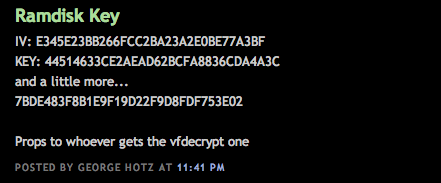
GeoHot has managed to decrypt the RAMDisk for the iPhone 3GS and has posted the key.
Once the vfdecrypt key is found it will be possible to use the key with the 'vfdecrypt' tool to decrypt the main filesystem DMG found in the .ipsw file.
Ramdisk Key IV: E345E23BB266FCC2BA23A2E0BE77A3BF KEY: 44514633CE2AEAD62BCFA8836CDA4A3C and a little more... 7BDE483F8B1E9F19D22F9D8FDF753E02
Props to whoever gets the vfdecrypt one
This news comes just after GeoHot posted an image demonstrating a custom command to iBoot.
And it has started once again. Just as was the case when jailbreaks for the iPhone 3G were surfacing , tough it took a while back then, jailbreakers are coming up with exploits in the new 3GS which might make it easy for jailbreaking. In a recent blog post by GeoHotz, he has put up an image of what seems to be a new "exploit" he just discovered for the iPhone 3GS (yeah, 3GS!).
Clearly depicted in the pic is a modified version of iBoot, which means he has somehow bypassed the sig check on the iBoot 596.24, which is the new one for the 3GS. The project he seems to be working on is what he calls "Purplera1n" or "purple rain" instead. He's even put up the site for it athttp://purplera1n.com/ though all it sports is a pic of him with the phone, getting wet in purple rain . . .
However, as said by some other big names like posixninja, this is an exploit which could be built into a Tethered Jailbreak and is not even sure if it will ever get developed into a full fledged "Jailbreak" due to the obstacles involved.
Quote:
iZsh: my guess: he’s just playing around, I don’t think he’ll do a full jailbreak.
On the other hand, the iPhone DevTeam member iZsh has similar thoughts who believes that GeoHotz might not be working on a jailbreak solution from the scratch, especially when tools like Pwnage and redsn0w already exist. All he might do is hand it over to the Chronic Dev or iPhone DevTeam to work on it or there is even a possibility that this exploit will never be disclosed to anyone.
We do hope there's a working jailbreak based on it out soon for our 3GS folks!


 Be sure to have legit activated 3GS