The king of unlock GeoHotz, the renowned iPhone hacker to provide a hardware unlock technique for the first generation iPhone, is now back with another blow. As stated on his blog, he has been successful in trying to execute an arbitrary code on an iPhone with the baseband 05.11.07 which is currently not unlock-able. It actually means that the iPhones running on 3.1.x firmware out-of-the-box will soon be able to be unlocked and be used with any carrier other than AT&T. Currently the unlock solution provided by the iPhone dev team requires one to have an iPhone that has been Jailbroken previously. This new milestone will help those iPhone users who might have accidentally updated to the latest firmware and may not have been able to preserve the baseband. And also the ones who recently purchased a new iPhone with the latest baseband. The image below explains pretty much everything. GeoHot will be releasing a tool named Blacksnow that would be taking care of the unlock. This is by far the most complicated unlock as it breaks into the baseband. As soon as the tool is release, we will provide detailed instructions on how to use it to unlock the iPhone on baseband 05.11.07

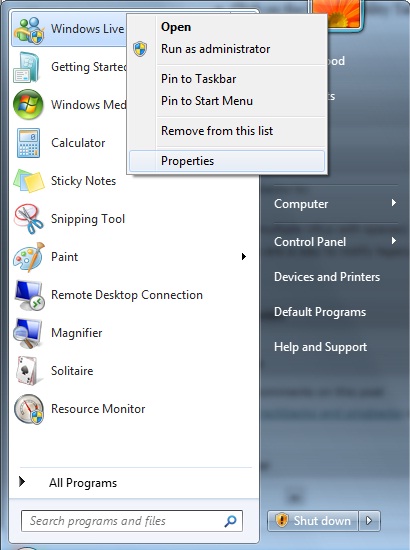
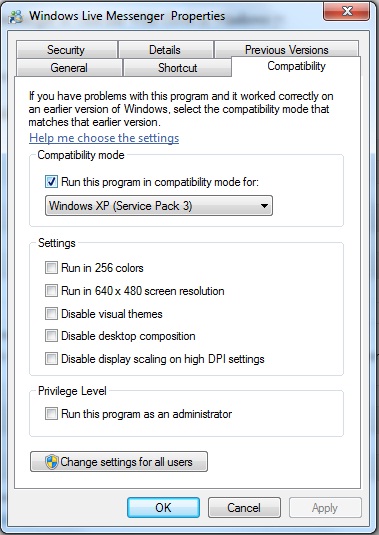
Annoyed with the fact that Msn stays in your task bar on Win 7? Well that was the case for me, when I used to login/run Windows Live Messenger, it used to appear in the full start menu bar instead of going down in the task-bar near the clock. The huge tab of Windows 7 was disturbing me when I was running lots of applications. So after a little hanky panky I figured out how to make Windows Live Messenger appear in the task-bar (near clock) instead of appear in the full start task-bar. How to send Windows Live Messenger in Task Bar With Clock in Windows 7: